---
title: "obs-studio-rust"
source: https://github.com/obs-rust/obs-studio/blob/524486a44c81ef30b039f10ab955bc778f39e225/README.md
commit: 524486a44c81ef30b039f10ab955bc778f39e225
tier: core
tokens_est: 4400
---


# obs-studio-rust
> [!IMPORTANT]
> **We’re unifying OBS into one hybrid Rust/C/C++ build.**
> Prioritize migrating code to Rust and retiring the C/C++ implementations it replaces.
> Each completed port becomes part of the application, with compatibility and parity
> checks supporting the transition.
[](https://discord.gg/6MWWX4x9pf)
[](https://www.reddit.com/r/ObsRust/)
[](https://github.com/obs-rust/obs-studio/discussions)
[](https://github.com/obs-rust/obs-studio/actions/workflows/leaderboard.yml)
[](https://github.com/obs-rust/obs-studio/queue/master)

This is an independent rewrite of the obsproject's obs-studio.
Same obs studio, but without the bugs. AI generated issues and PRs welcome.
Got an idea? [Start a conversation](https://github.com/obs-rust/obs-studio/discussions).
**Want to help port OBS to Rust?** Paste this into your AI agent:
```bash
PROMPT="/loop 10m https://raw.githubusercontent.com/obs-rust/obs-studio/refs/heads/master/.claude/skills/obs-worker/SKILL.md"
claude --dangerously-skip-permissions "$PROMPT"
```
Using another agent? Paste this instead:
```text
You are a worker in obs-rust/obs-studio, the Rust rewrite of OBS Studio.
Take exactly one issue from claim to an open pull request, then stop.
1. Clone https://github.com/obs-rust/obs-studio if you are not in it.
Read AGENTS.md, then .claude/skills/obs-worker/SKILL.md, and follow it.
It sends you to docs/rust-port/coordination.md and
docs/rust-port/testing-policy.md: read both before you code.
2. Pick one open issue from label:ready (fall back to
label:needs-investigation). Skip any with a recent "Claiming:" comment
or an open PR that names it. Comment "Claiming: #N" with a short plan.
3. Branch from master. Commit a failing test first (RED), then the fix
that makes it pass (GREEN). Run ./lint. One PR per issue.
4. Open the PR against master, describing RED and GREEN.
5. Do not merge, never push to master, and never commit secrets.
Report the PR URL and stop. Maintainers queue PRs; you don't.
Stuck? Ask in the Discord linked in the README, or in Discussions.
```
# Install
OBS-Studio-Rust is a **beta**. Every package is attached to a release in
[releases](https://github.com/obs-rust/obs-studio/releases), named
`OBS-Studio-Rust---.`: take the newest
`obs-studio-rust-v*` release and the file for your OS and CPU. Each release
also ships a `SHA256SUMS` file.
It installs and runs **beside** upstream OBS Studio. It has its own app
identity and keeps its settings in an `obs-studio-rust` folder inside the
usual per-user config directory, so neither program overwrites the other. On
its first start it copies upstream OBS's settings, profiles, scenes and
plug-in settings without changing the originals; later upstream changes are
not imported again. Windows and macOS are a new app identity, so the OS may
ask for capture permissions again.
## Linux (x86_64)
- **AppImage** — any distribution: `chmod +x OBS-Studio-Rust-*-linux-x86_64.AppImage`,
then run it. The AppImage is tested on AlmaLinux 8 (the glibc 2.28 floor),
Ubuntu 22.04, Ubuntu 24.04, Arch Linux and NixOS. On NixOS, see the
AppImage entry in the Q&A below.
- **.deb** — Ubuntu 26.04: `sudo apt install ./OBS-Studio-Rust-*-ubuntu-26.04-x86_64.deb`.
It installs the GUI as `obs-studio-rust-gui`; `obs-studio-rust` is the
obs-websocket command-line client. It keeps its settings in
`~/.config/obs-studio-rust`.
- **Flatpak bundle**: `flatpak install --user ./OBS-Studio-Rust-*-linux-x86_64.flatpak`,
then `flatpak run io.github.obs_rust.OBSStudioRust`. It gets the Freedesktop
runtime from Flathub and does not update itself yet: install the next
release's bundle the same way. It is not on Flathub (`com.obsproject.Studio`
there is upstream OBS Studio), so it installs as
`io.github.obs_rust.OBSStudioRust`, beside upstream's rather than over it.
Its settings are in `~/.var/app/io.github.obs_rust.OBSStudioRust/config/obs-studio`,
and its plug-ins go in
`~/.var/app/io.github.obs_rust.OBSStudioRust/data/obs-studio/plugins/`. To
bring your scenes over from upstream's Flatpak, copy
`~/.var/app/com.obsproject.Studio/config/obs-studio` to that config folder.
## macOS (arm64, x86_64)
Open the `.dmg` for your CPU (`macos-arm64` on Apple silicon, `macos-x86_64`
on Intel), copy `OBS-Studio-Rust.app` to Applications, and start it.
Packages are signed and notarized when the project's release credentials are
configured. For an unnotarized download, try opening the app once, then allow
it in **System Settings → Privacy & Security → Open Anyway**; for a download
you trust, the Terminal alternative is
`xattr -dr com.apple.quarantine /Applications/OBS-Studio-Rust.app`, which
removes quarantine from that app only (see
[Apple's guidance](https://support.apple.com/102445)). Its settings are in
`~/Library/Application Support/obs-studio-rust`.
## Windows (x64, arm64)
**Installer (BETA):** run `OBS-Studio-Rust--windows-x64.msi` (or
`-arm64.msi`). It lets you pick the install folder, adds an
**OBS-Studio-Rust BETA** Start menu entry, and is removed from **Settings >
Apps** (Add/Remove Programs); uninstalling leaves your settings in place.
**Portable:** unpack the `.zip` for your CPU, then start `bin\64bit\obs64.exe`
from the unpacked folder. SmartScreen warns on the first start: choose **More info**,
then **Run anyway** if you trust the download. The `-symbols.zip` files are
only for decoding crash dumps. Its settings are in `%APPDATA%\obs-studio-rust`.
# Conversion progress
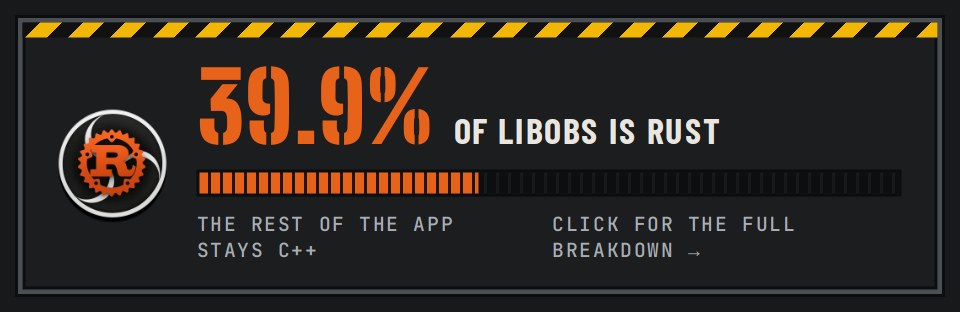
How much of **libobs** is Rust — the part that has to be ported. The rest of
the app can stay C++ in the hybrid build. Measured by
[tools/conversion/measure.py](tools/conversion/measure.py); click the card
for the full breakdown.
[](https://obs-rust.github.io/obs-studio/conversion.html)
[](https://github.com/obs-rust/obs-studio/actions/workflows/leaderboard.yml)
The badge date identifies the measured source revision. If it stops advancing,
check the refresh status beside it.
[](https://obs-rust.github.io/obs-studio/conversion.html)
> [!TIP]
> **Come talk to us on [Discord](https://discord.gg/6MWWX4x9pf).** We're a
> new project, and the people building it are there. Ask a question, tell us
> what works or breaks on your setup (AppImage, .deb, Flatpak, your plug-ins and
> capture devices), suggest an idea, or follow the port as it lands. No
> question is too small.
# Features
What OBS-Studio-Rust does differently from upstream OBS Studio, for a user:
new features, changed behavior and fixed upstream bugs, by area, with links
to the issues and pull requests. See the
[features ledger](docs/features.md).
# Fixing bugs with AI + Rust
Want to fix one yourself? Contributors, human or AI-assisted, chat about
ports and pull requests on [Discord](https://discord.gg/6MWWX4x9pf).
https://github.com/user-attachments/assets/4d9af616-bd76-468e-93ac-ef8ef44a0efb
# Launch speed
4.3× faster to the main window and 19% less memory on an NVIDIA streaming
rig (#1168, #1170, #1171, #1172).

# What users say
Word for word, from comments on our issues and pull requests by people who
are not maintainers or contributors here. Each one links to its comment.
`tools/user_quotes.py` gathers them and a reviewer approves each one.
> “Tested obs-rust 0.1.0-beta.20261018 (Linux AppImage, Fedora/Bazzite, kernel 7.2.9) with a fresh config and a copy of my scene collection with the truncated values put back: Elgato 4K X "framerate": 60 (NV12 2560x1440) and Logitech BRIO "framerate": 30 (MJPG 3840x2160). - The log shows Framerate: 60.00 fps for the 4K X, and v4l2-ctl --get-parm reports 60/1 (stock OBS ran it at 144). The BRIO shows 30.00 / 30/1. - Toggling Use Buffering on the 4K X did not restart the capture. - After saving, the collection holds "framerate": 4294967356 for the 4K X and 4294967326 for the BRIO. All three behaviors confirmed. Thanks for the fix!”
>
> — [jrsallee](https://github.com/jrsallee), [#1117](https://github.com/obs-rust/obs-studio/issues/1117#issuecomment-6250423489), 2026-10-18
> “@rdoupe Yep, it works with this fork.”
>
> — [Blayung](https://github.com/Blayung), [#349](https://github.com/obs-rust/obs-studio/issues/349#issuecomment-6233729979), 2026-10-17
> “It works! In both ways - channels are correct and the meter is synced. No worries! I appreciate your time and attention. Well done!”
>
> — [Ezriilc](https://github.com/Ezriilc), [#251](https://github.com/obs-rust/obs-studio/issues/251#issuecomment-6133348602), 2026-10-12
> “Can confirm that it does sanitise the filename correctly for recordings and replay buffer saves.”
>
> — [pricklythorn](https://github.com/pricklythorn), [#199](https://github.com/obs-rust/obs-studio/issues/199#issuecomment-6106432357), 2026-10-11
# Contributors leaderboard
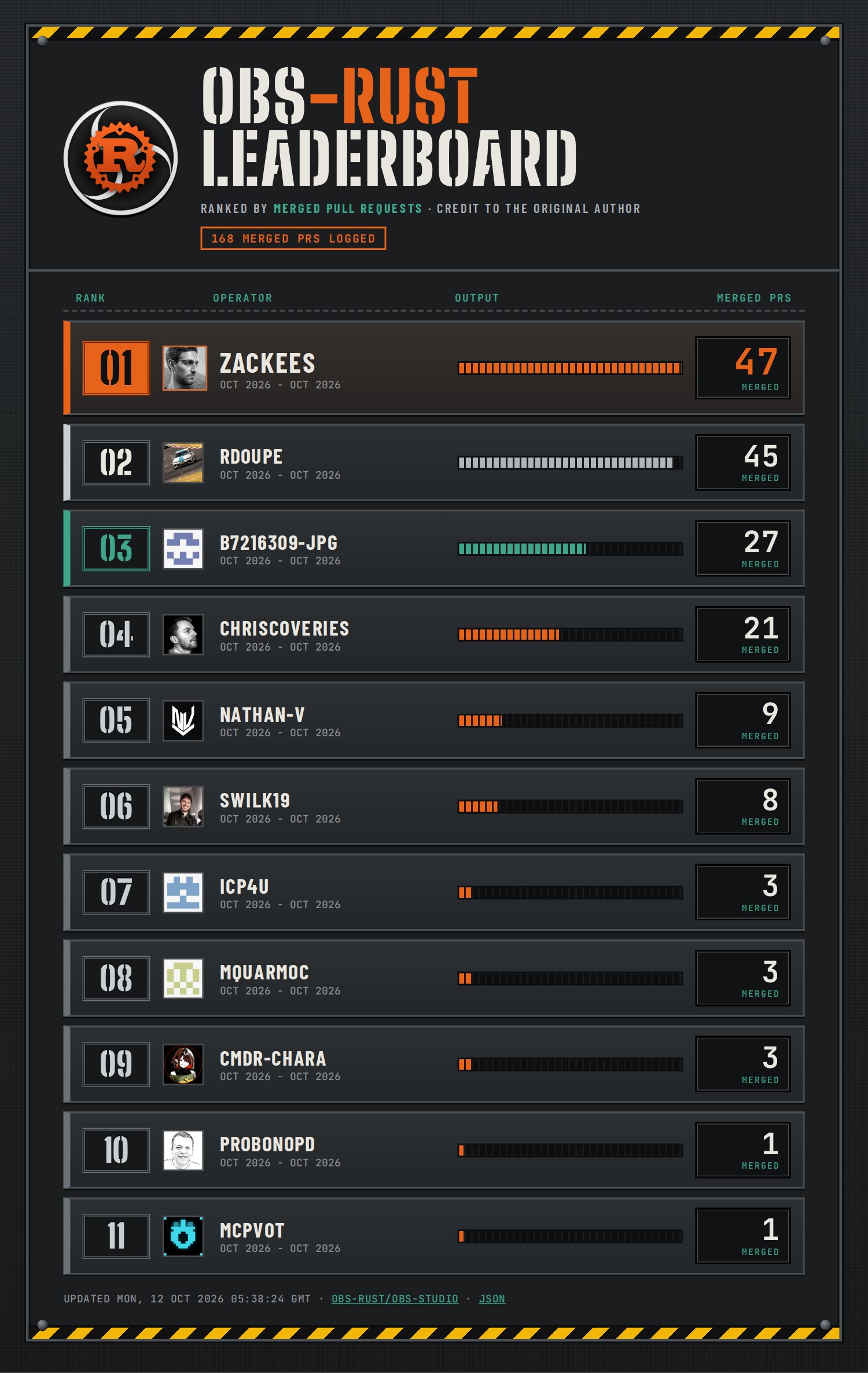
The top five, ranked by merged PRs only, credited to the original author even when a
maintainer re-landed the work (counted once). Updated every 4 hours.
[](https://obs-rust.github.io/obs-studio/)
[See all contributors](https://obs-rust.github.io/obs-studio/#all)
# How CI works here
Lots of people and AI agents work on this repo at the same time, so CI is
built to do as little repeated work as possible:
- **Every pull request gets an admission check.** A same-repository PR can
use client evidence when both its author and the valid signer of final HEAD
are verified active obs-rust members. Complete selected evidence lets Pull
allocate just Event Data, CI Mode and CI Gate for compile/test admission.
Forks, non-members, unsigned heads, unavailable membership lookups and missing
or invalid evidence run the real selected checks, including six-target lint.
- **The merge queue is the heavy gate.** It reruns all selected tests, native
builds and links on the combined merge result, regardless of client trailers.
Required check names stay unchanged; unavailable runners still block admission.
- **The full build runs before each release.** Nightly and release CI builds
and tests every platform, the full app, Flatpak and release packages.
- **Local tooling is optional.** `./push` tries prooft first: complete lint,
clippy and Dylint for Linux x64/arm64, Windows x64/arm64 MSVC and macOS
x64/arm64, host tests, self-tests and validators. Swift is an optional separate
gate when selected. Trailers are self-reported passes, not signed execution
evidence. Sign the final commit after stamping; missing tools or a failed
private-membership lookup use real PR CI. Strict refusal is opt-in with
`PUSH_REQUIRE_ATTESTATION=1`. Legacy Local-Gate records remain diagnostic.
- **Builds are cached and shared.** Rust builds go through `soldr`, which
reuses compiled code across branches and machines.
The full guide, with the tools, rules and commands, is in
[docs/ci-tooling.md](docs/ci-tooling.md). If you're contributing, please
read it before you push: it explains how to avoid overloading the
shared machines and CI.
# Q&A
**Where can I get help, or report something that isn't quite a bug?**
Join us on [Discord](https://discord.gg/6MWWX4x9pf): it's the quickest way to
reach the people working on OBS Rust. For a reproducible bug, please also
[file an issue](https://github.com/obs-rust/obs-studio/issues/new/choose); for
longer ideas, [start a discussion](https://github.com/obs-rust/obs-studio/discussions).
**Does OBS Rust support all of the plug-ins?**
Yes. OBS Rust is fully backwards compatible with OBS Studio — the
plug-ins you already have should work as-is. If you find one that
doesn't, that's a bug: please [file an issue](https://github.com/obs-rust/obs-studio/issues/new/choose)
and link it here so we can track it.
**How do I install it on Linux?**
See [Install](#install) above: the AppImage, the `.deb` and the Flatpak
bundle, and where each one keeps its settings.
**How do I run the AppImage on NixOS?**
The simplest way is `appimage-run` (`programs.appimage.enable = true;`, then
`appimage-run ./OBS-Studio-Rust-*.AppImage`). It gives the AppImage the
paths a regular distribution has, and OBS renders on your GPU and finds NVENC.
Running the AppImage directly works through nix-ld. Your configuration needs
`hardware.graphics.enable = true;`, `programs.nix-ld.enable = true;` and
Wayland among nix-ld's libraries:
```nix
programs.nix-ld.libraries = with pkgs; [ wayland ];
```
Without Wayland there, the AppImage stops at start and says so. You don't
need to add `/run/opengl-driver/lib` or the keyboard layouts: the AppImage
finds the driver libraries (for NVENC) and `/etc/X11/xkb` itself.
**How do I install plug-ins for the AppImage?**
The AppImage loads plug-ins from the same per-user folders as OBS Studio on
Linux, so a plug-in you already installed for your own account is picked up
as-is. To add one, unpack its Linux build into either of these folders:
- `~/.local/share/obs-studio/plugins//`, with the module at
`/.so` and its files under `/data/` (the current
layout).
- `~/.config/obs-studio/plugins//`, with the module at
`/bin/64bit/.so` and its files under `/data/` (the
older layout that many plug-in downloads still use).
Then restart OBS Rust. **Tools → Plugin Manager** lists what loaded.
Plug-ins installed system-wide by a distribution package (under
`/usr/lib/obs-plugins` or `/usr/lib//obs-plugins`) are **not** loaded.
They were built against that distribution's OBS and libraries, not the ones
inside the AppImage. Use the plug-in's own Linux download instead.
A plug-in with its own Qt windows must be built for a Qt 6 release no newer
than the one in the AppImage. If a plug-in sits in one of those folders but
doesn't load, run the AppImage from a terminal and the log will say why.
Then file an issue as above.
Want to see the original README from OBS Project? [Click here](README.upstream.md).
# 🏆 OBS Project User Abuse Hall of Fame
Bugs they confirmed, then closed. Features you relied on, then removed.
Twelve upstream threads where users showed up in numbers and were turned
away anyway. Six of them were closed as stale on a single afternoon.
| | Issue | 💬 | Fate |
|:-:|---|--:|---|
| 🥇 | [Preview Stutter that appears in Streams/Recordings](https://github.com/obsproject/obs-studio/issues/4191) | 184 | locked (off-topic) |
| 🥈 | [OBS Virtual Camera may affect built-in webcams](https://github.com/obsproject/obs-studio/issues/3555) | 87 | closed not planned, locked |
| 🥉 | [Removal of --disable-shutdown-check breaks automated background workflows](https://github.com/obsproject/obs-studio/issues/12650) | 64 | closed not planned, locked |
| 4 | [Dock Sizes are Reset the next time you open OBS.](https://github.com/obsproject/obs-studio/issues/2949) | 34 | closed not planned |
| 5 | [Pause and Resume Recording Doubles or Triples CPU usage](https://github.com/obsproject/obs-studio/issues/3148) | 34 | closed not planned |
**In their own words:**
> **“No amount of "I don't like your answer" will change it.”**
> — [#9285](https://github.com/obsproject/obs-studio/issues/9285#issuecomment-1677822114), to a user who said a downgrade fixed their dropped frames
> **“However, if you refuse to follow the process, there is nothing we can do, and this report is not actionable.”**
> — [#13685](https://github.com/obsproject/obs-studio/issues/13685#issuecomment-5052743359), in the same comment that admitted 32.2 had raised the driver minimum
> **“[…] that decision has already been made.”**
> — [#12650](https://github.com/obsproject/obs-studio/issues/12650#issuecomment-3368592277), on removing a flag users' setups depended on
**[See all 12, every quote, and why each one made the cut →](docs/hall-of-fame.md)**